
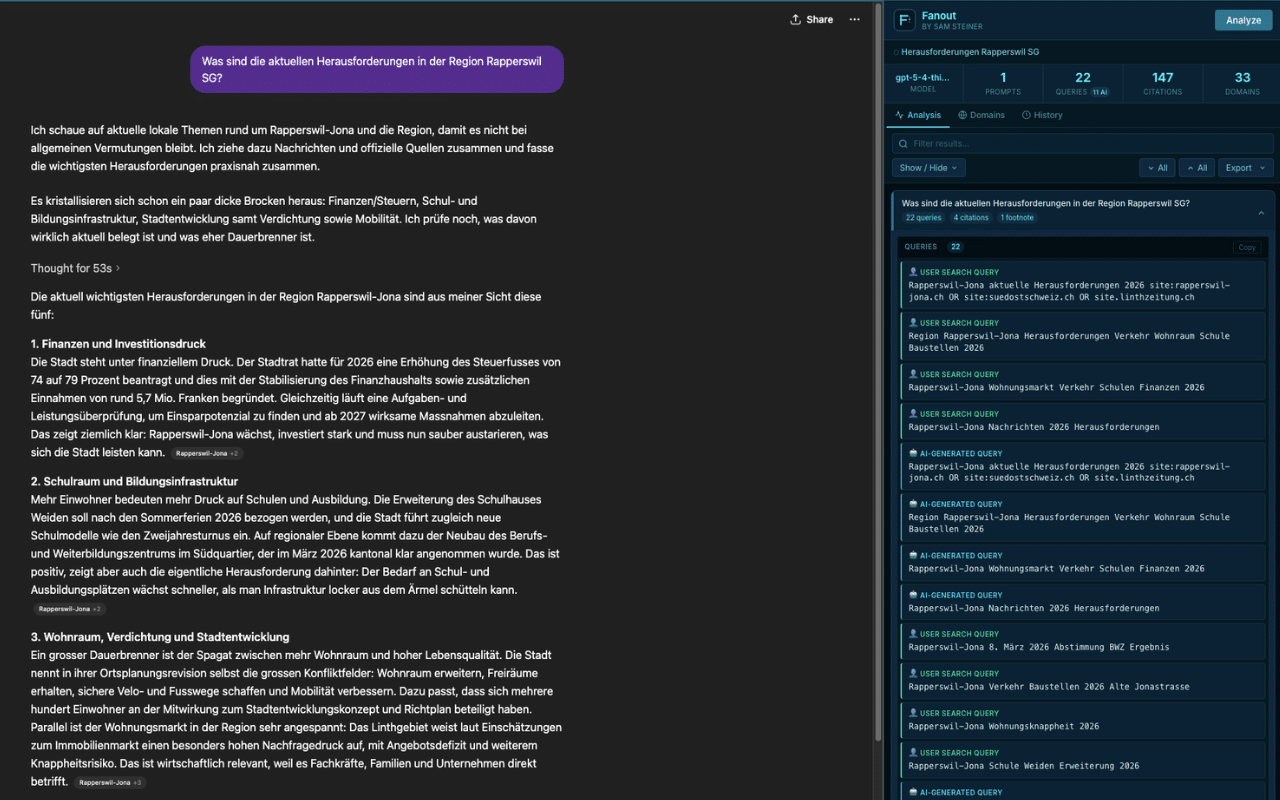
«Fanout» opens as a side panel alongside ChatGPT and makes the hidden machinery of a conversation visible: every search query the model generated, every source it cited, which domains it trusted most, and what named entities it identified — all organized by prompt.
When you ask ChatGPT something, it asks up to 20 or even more questions behind the scenes.
Now you can see them – and optimise for them. Which ups your chances of being mentioned. Fun fact: it asks those questions in Bing. Make sure to check your «Bing Webmaster Tools».
Get Fanout for free
What it shows
- Search queries the AI generated (the «fanout») and any queries you typed
- Grouped and ranked citations from ChatGPT’s web search
- Footnote sources and supporting links
- Named entities identified in the response
- Image search queries
- Domain frequency table across the whole conversation
Why it’s useful
When ChatGPT answers a question, it doesn’t search for what you typed — it generates a cluster of sub-queries behind the scenes. Fanout makes that cluster visible, which is valuable for anyone trying to understand how AI models source and rank information.
Completely private and safe
Fanout makes no network requests of its own. It reads your ChatGPT conversation using your existing browser session — the same data your browser already has — and displays it locally. Nothing is sent to any external server. No analytics, no tracking, no account required. All history is stored in your browser’s local storage and never leaves your machine. You can verify this: the full source code is available on GitHub.